Sometimes I come back to abandoned projects.
Then I find what used to feel clean and modern now feels brittle, outdated, and awkward to work in.
At that point, trying to “upgrade” the existing codebase by hand takes too much effort.
The starter template that bootstrapped the project has moved on. Tooling has improved. Conventions have shifted. New patterns have emerged. And even if I’ve been meticulously tracking upstream changes, my project is effectively frozen in time.
I have tried to manually diff my code against the latest version of the template. In practice, that turns into a tedious archaeology exercise where I dig through commits, guess intent, and hope I didn’t miss something subtle but important.
So I took a different approach:
I start over.
My Clean Slate Approach
Instead of dragging an old codebase forward, I regenerate another project using the latest tooling:
pnpm create next-app@latest my-app --yes
And no, I don’t mean running that command directly on to the existing app and hoping it refreshes things in place. It won’t. The CLI blocks you if the directory already contains a project:
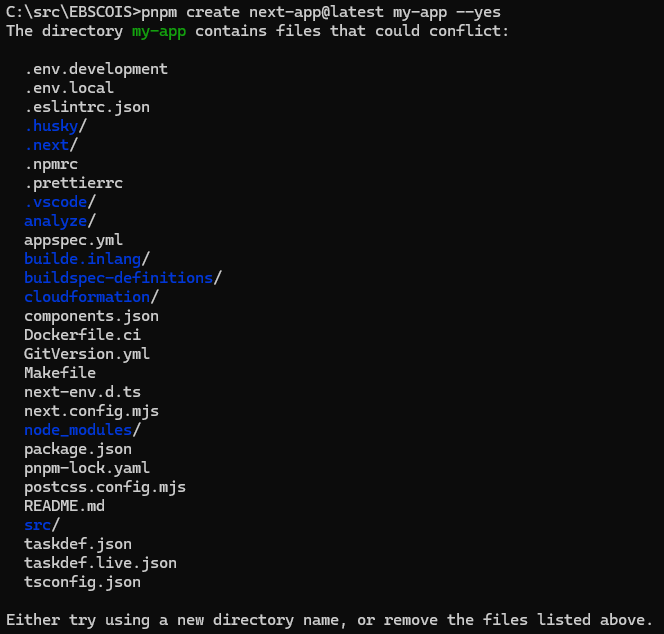
Running in a new directory gives me a pristine baseline that reflects how the project should look today.
There’s just one problem.
This new directory is its own Git repository. My original project already has history, a remote, and a workflow I don’t want to throw away.
If I try to open a PR, GitHub blocks me:
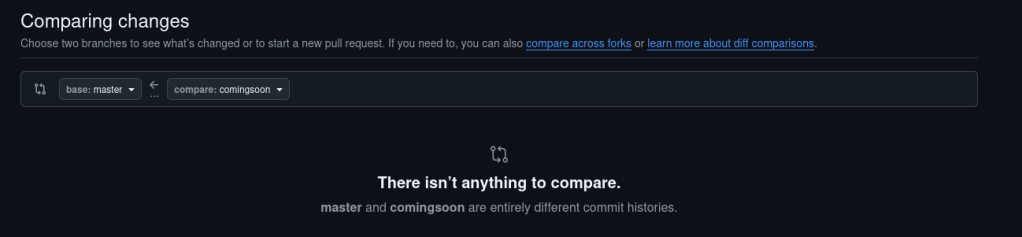
The Unrelated Histories Problem
The old repo and the new template project don’t share a commit history.
masterbranch might be at079d222- My fresh branch, maybe
comingsoon, is at28ca74a - There’s no merge base
Git can’t diff them because, structurally, they’re unrelated.
The Fix Without Nuking History
I don’t want to:
- delete the repo and recreate it
- lose history
- force-push and overwrite everything
So instead, I rebuilt the new codebase on top of the existing history:
git fetch origingit checkout -b comingsoon-pr origin/mastergit rm -r .git checkout comingsoon -- .git add -Agit commit -m "Replace app with comingsoon codebase"git push -u origin comingsoon-pr
Now I can open a normal pull request and merge it cleanly.
What This Actually Did
It just uses the existing repository history as the base, then replaces the working tree in a normal commit.
Anchor to existing history
git checkout -b comingsoon-pr origin/master
This starts a new branch from the current remote branch, so your work stays connected to the real history of the repository.
Remove the old code
git rm -r .
This stages the deletion of everything currently tracked.
That sounds dramatic, but it isn’t destructive in the Git-history sense. You are not erasing the past. You are just creating a new commit whose contents no longer include those files.
Overlay the new codebase
git checkout comingsoon -- .
This copies all files from the fresh template branch into the current branch.
The Bigger Point
I’m preserving history. I’m keeping the PR workflow intact. I’m avoiding destructive Git operations. And I’m treating the template as a movable baseline instead of a one-time bootstrap.
I wouldn’t recommend this solution for every situation but sometimes its nice to get a fresh start 🙂


Leave a comment