In the Model Context Protocol (MCP), tool and resource responses are intentionally structured to separate machine reasoning, user presentation, and implementation details.
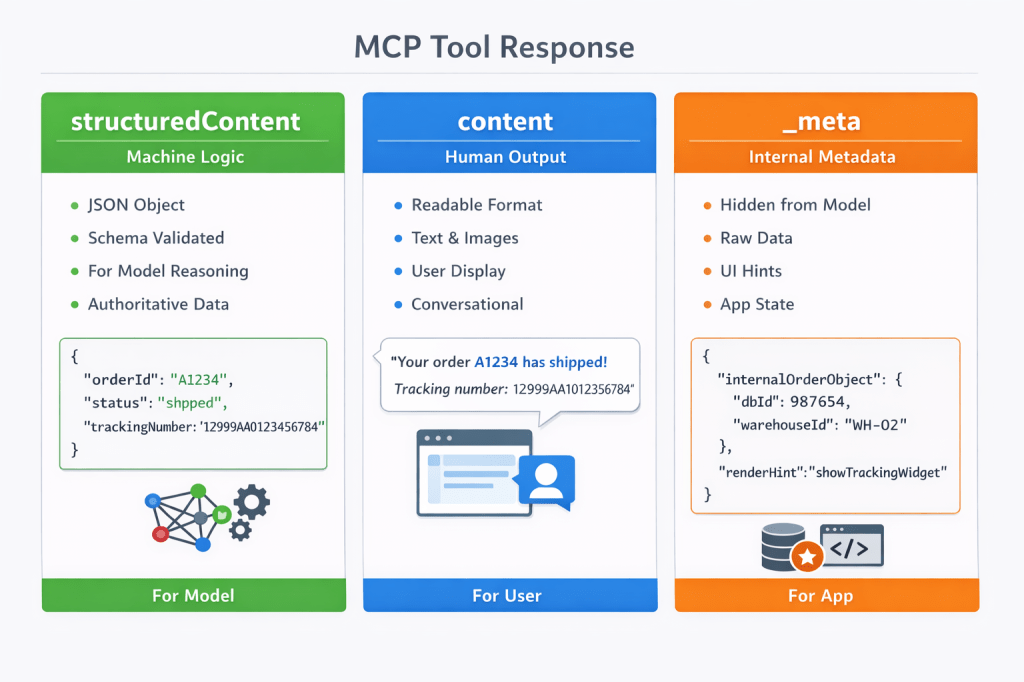
Below is a breakdown of the three primary response fields.
1. structuredContent
Purpose: Machine-readable payload for the model and orchestration layers.
What it is
- A JSON object
- Must conform to the declared
outputSchema(if defined) - Designed for deterministic reasoning and tool chaining
Who uses it
- The LLM
- The MCP Client
Key properties
- Strongly typed
- Predictable structure
- Not optimized for display
- Contains authoritative result data
Example
{ "structuredContent": { "orderId": "A1234", "status": "shipped", "trackingNumber": "1Z999AA10123456784" }}
This is what the model uses to reason, branch logic, or pass into another tool.
2. content
Purpose: Human-readable output for conversational display.
What it is
- An array of content blocks
- Intended for chat/UI rendering
- Optional but recommended for user-facing tools
Who uses it
- The LLM
- The MCP Client
- The end user in the UI
Key properties
- Optimized for readability
- May summarize or explain structured results
- Can contain markdown or formatted text
- Does not need to strictly match schema
Example
{ "content": [ { "type": "text", "text": "Your order A1234 has shipped. Tracking number: 1Z999AA10123456784." } ]}
This is what the user sees in the interface.
3. _meta
Purpose: Out-of-band metadata not exposed to the model.
What it is
- Arbitrary JSON object
- Not part of conversational content
- Invisible to the LLM
Who uses it
- The MCP Client
Key properties
- Hidden from the model
- Can contain raw internal objects
- Often used for UI hydration
- Can avoid duplicating large datasets in
structuredContent
Example
{ "_meta": { "internalOrderObject": { "dbId": 987654, "warehouseId": "WH-02", "rawCarrierPayload": { ... } }, "renderHint": "showTrackingWidget" }}
The model never sees this data. It is strictly for application-layer use.
How They Work Together
A complete MCP tool response may include all three:
{ "structuredContent": { "orderId": "A1234", "status": "shipped", "trackingNumber": "1Z999AA10123456784" }, "content": [ { "type": "text", "text": "Your order A1234 has shipped and is on the way." } ], "_meta": { "warehouseLocation": "Nevada", "uiComponent": "tracking_card" }}
Conceptual Separation
| Field | Purpose | Seen by Model | Seen by User | Typed |
|---|---|---|---|---|
structuredContent | Machine reasoning | Yes | Indirectly | Strongly |
content | Conversation | Yes | Yes | Loosely |
_meta | Implementation | No | No | Free-form |
When to Use Each
Use structuredContent when:
- The result must drive tool chaining
- Deterministic schema validation is required
- Output is operational rather than explanatory
Use content when:
- The result must be readable in chat
- You want to provide explanation or narrative context
Use _meta when:
- The client needs raw backing data
- UI hints or rendering instructions are required
- Sensitive internal state must not be exposed to the model
- Large datasets are needed for rendering but not reasoning
Common Design Pattern
A clean implementation strategy:
- Put canonical data in
structuredContent - Put explanation or summary in
content - Put heavy, internal, or UI-only data in
_meta
Avoid:
- Placing raw backend payloads directly into
structuredContent - Exposing sensitive data the model does not need
- Using
_metafor data required for model reasoning
Bottom Line
structuredContent= structured truth for machinescontent= conversational output for humans_meta= private implementation details for the host
Designing with clear separation between reasoning data, presentation data, and implementation data results in clean, scalable MCP tool interfaces.
 Reburn Report
Leave a comment