If you’ve been working with databases for a while, you might be wondering about performance or scalability. You may have heard about pages, or how SQL processes the data you give it.
Understanding the architecture can help you design and develop databases that run more efficiently. You’ll be working with these data structures indirectly, so understanding them will help you structure your data more efficiently. Let’s take a closer look at pages.
Pages
Microsoft SQL Server uses pages to store data on disk. Each page is 8 KB and has a 96-byte header that stores metadata such as the page number, page type, amount of free space on the page, and the ID of the object that owns the page. Here is the page data structure:
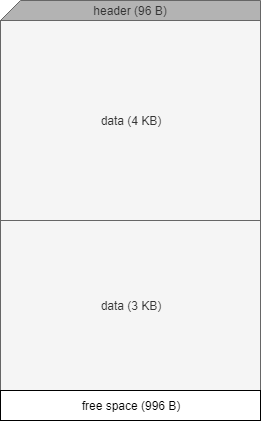
The example shows two blocks of data on a single page that belong to one owner. A page can have only one owner. The page can face unused space that can be filled later if data can fit; otherwise, the data could be split across two pages. We’ll take a closer look at page splits soon. The page has a header that indicates the type of data that is contained inside the page. For reference, a page can be one of the following types:
- Data
- Index
- Text/Image
- Global Allocation Map, Shared Global Allocation on Map
- Page Free Space (PFS)
- Index Allocation Map
- Bulk Changed Map
- Differential Changed Map
Data and Text/Image types are heavily influenced by you as a database developer. The Data type represents data in a table row; however, there are a few column types that will not be represented in this page type when text in row is set to ON. These are text, ntext, image, nvarchar(max), varchar(max), varbinary(max), and xml data. They will get stored in the Text/Image page type instead.
The data on the page will either fit on a single page or, for larger column types (like blobs), there will be a pointer that references another block of storage that contains the actual data. SQL Server reads a minimum of 1 page from disk, even if you only need one row for the query’s result. The page architecture also limits a row to 8,060 bytes of data but there are many ways around this problem. Most of us will never run into this problem unless we have hundreds of columns per row or long column lengths, which is a sign of poor design decisions.
SQL Server keeps track of all pages by storing them in extents. An extent is a group of 8 pages. Even if some of the pages in an extent are empty, the extent still counts as 8 pages. Remember, when SQL Server needs to read data from disk, it will read an entire extent into memory, not just the pages that contains data.

 Reburn Report
Leave a comment